
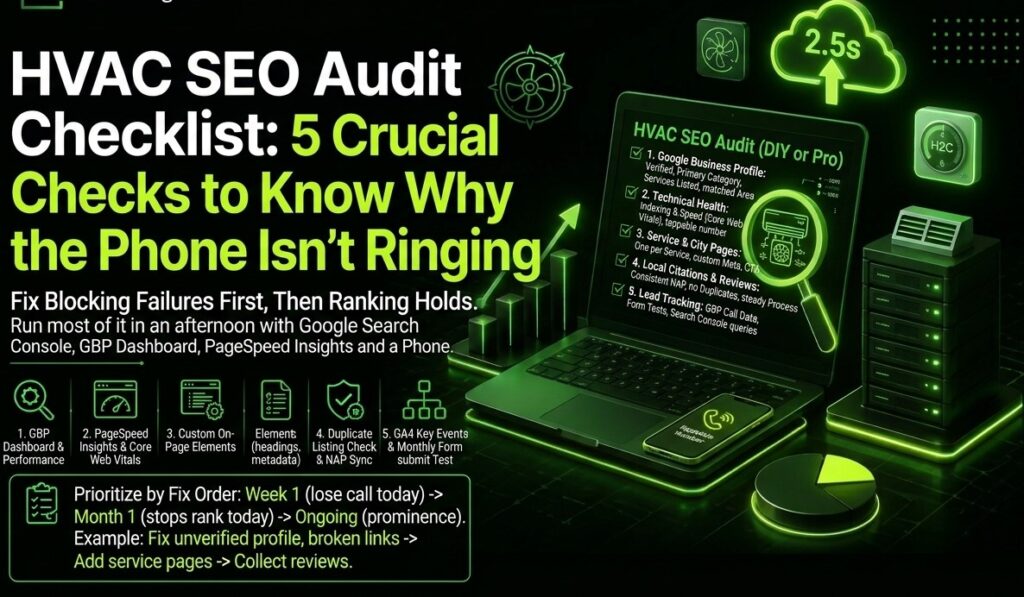
An SEO audit for an HVAC company checks six things: your Google Business Profile, your website’s technical health, your service and city pages, your local citations and reviews, your schema and AI search readiness, and whether calls and forms from search are tracked. Each check has a pass or fail answer. Fix the failures that block calls first (a broken phone link, a missing service page, an unverified profile), then the ones that hold rankings back.
This checklist is built for owners and office managers who want to know why the phone isn’t ringing from Google, and what to fix in what order. You can run most of it in an afternoon with free tools: Google Search Console, your Google Business Profile dashboard, PageSpeed Insights and a phone.
What an HVAC SEO audit should tell you
A useful audit answers three questions. Where do you show up today (Maps, organic results, or neither)? What is stopping you from showing up for the jobs you want, like AC repair, furnace replacement or heat pump installs? And which fixes will bring in calls soonest?
Google says local results are based mainly on relevance, distance and prominence. You can’t change distance. Everything in this audit works on relevance (does Google understand what you do and where) and prominence (do reviews, links and mentions show you are an established company).
1. Google Business Profile checks
The profile is often the first thing a homeowner sees in Google Maps, so start here.
•Verified and owned by you. The profile is verified and the owner login belongs to the company, not a past agency or employee.
•Primary category is right. “HVAC contractor” or the closest match to your main revenue, with secondary categories for heating, air conditioning and any other trades you run.
•Services listed. Every service you want calls for is in the Services section, written the way customers search (“AC repair”, not “cooling solutions”).
•Service area matches where you work. Cities and ZIP codes you actually serve, with no address shown if you don’t take walk-ins.
•Name, phone and website are correct. The business name matches your signage, the phone is a number you answer, and the website link goes to the right page (often a location or service page, not the homepage).
•Hours are current. Including holiday and emergency hours if you offer 24/7 service.
•Photos are real and recent. Trucks, crew, finished installs. Google lists photos as one of the ways to improve local ranking.
•Reviews get replies. Every review, good or bad, has a short reply from the owner.
2. Technical website checks
These checks decide whether Google can find, load and trust your pages.
Indexing and crawling
•Search Console is set up. The site is verified in Google Search Console and a sitemap is submitted.
•Your key pages are indexed. In the Pages report, every service page, city page and the homepage show as indexed. Pages marked “Crawled, currently not indexed” or “Discovered, currently not indexed” need stronger content and more internal links.
•No leftover theme or demo pages. Template pages like “Sample Page” or demo portfolio items are removed or redirected, so they don’t soak up crawls or show up in search.
•HTTPS everywhere. Every page loads on https with no browser warnings.
Speed and mobile
•Core Web Vitals pass. Google’s “good” thresholds are 2.5 seconds or less for Largest Contentful Paint, 200 ms or less for Interaction to Next Paint, and 0.1 or less for Cumulative Layout Shift. Check the homepage and one service page in PageSpeed Insights on mobile.
•Phone number is tappable. On a phone, the number is a tel: link above the fold, and tapping it opens the dialer. Test it yourself.
•Buttons go somewhere. Every “Get a Quote” or “Book Now” button opens a working form or dials the phone. Dead buttons that link to “#” are common on template sites.
3. Service page and on-page checks
A homeowner searching “furnace repair” in your city should land on a page about furnace repair in your city, not your homepage.
•One page per core service. AC repair, AC installation, furnace repair, heat pumps, ductwork, maintenance plans. Each has its own page.
•Title tags name the service and city. For example “AC Repair in Bend, OR | Company Name”, under about 60 characters.
•One clear H1 per page that says what the page is about.
•Meta descriptions are written by hand and give a reason to call: same-day service, financing, licensed techs.
•Proof on the page. License number, years in business, brands you install, real reviews and photos of your own jobs.
•A call to action on every page. Phone, form or booking link, near the top and again at the end.
•Internal links. Service pages link to related services and to the cities you serve, so no page is orphaned.
For the full on-page list (headings, images, schema, content length), use our HVAC on-page SEO checklist.
4. Local citation and review checks
•Consistent name, address and phone (NAP). Your details match across Google, Bing Places, Apple Business Connect, Yelp, BBB, Angi and Facebook. Old phone numbers and old addresses are the usual problem.
•No duplicate listings. Search your phone number on Google and Yelp. Two listings for one location split your reviews and confuse Google.
•Review count and rating hold up against the top 3. Compare your count, average rating and how recent your latest reviews are against the three HVAC companies in the Maps results for your main service and city.
•A steady review process. Techs ask at the end of every job, and a text with the review link goes out the same day.
•Some local links. Supplier and manufacturer dealer pages, local chamber, sponsorships and trade associations link to your site.
5. Schema and AI search checks
Homeowners now see AI answers at the top of many Google searches. Google says there are no extra requirements to appear in AI Overviews or AI Mode: a page has to be indexed and eligible to show in Search with a snippet. So the checks below are ordinary SEO, done well.
•Key pages can show a snippet. No noindex tag, no nosnippet tag, and the page is indexed in Search Console. A page Google can’t show in normal results won’t be cited in AI answers either.
•LocalBusiness schema is on the site. Google uses LocalBusiness structured data to read details like your hours. It needs at least your business name and address. Use the HVACBusiness type if your SEO plugin offers it.
•Schema matches the page. Hours, phone and services in your schema say the same thing as the visible page and your Google Business Profile. Mismatches are common after a move or a new phone number.
•Service pages answer the question first. The first paragraph of each service page says what you do, where and how to book, in plain words. That is the text most likely to be quoted.
•FAQs are real questions. Add FAQ sections with the questions customers ask on the phone (cost, timing, brands, financing), and mark them up with FAQ schema if your plugin supports it.
•Test it. Run your homepage and one service page through Google’s Rich Results Test and fix any errors it lists.
6. Lead tracking checks
If you can’t see which calls came from Google, you can’t tell whether SEO is working.
•Calls from the profile are counted. Check the calls figure in your Google Business Profile performance report each month.
•Website calls and forms are tracked. Phone link clicks and form submissions are set up as key events in Google Analytics 4, or a call tracking number is used on the site.
•Forms work. Submit a test from your phone once a month and confirm the email arrives.
•Search Console is checked monthly. Look at clicks, impressions and the queries that bring you traffic. Queries ranking in positions 8 to 20 are the easiest wins.
Compare yourself against the top 3
Pass or fail only tells half the story. The other half is how you stack up against the companies that already get the calls.
•Find the top 3. Search your main service and city on a phone, for example “AC repair” plus your city. Note the three companies in the Maps results and the top three regular results.
•Compare their profiles. Primary category, review count, average rating, date of the latest review, number of photos. A gap in reviews or categories usually explains a gap in Maps.
•Compare their pages. Do they have a page for each service and each city you want? What do their title tags say? If they have an “AC repair in [city]” page and you don’t, that page is your first fix.
•Write down the gaps. Each gap becomes a line on your fix list, sorted with the three groups below.
How to prioritize what the audit finds
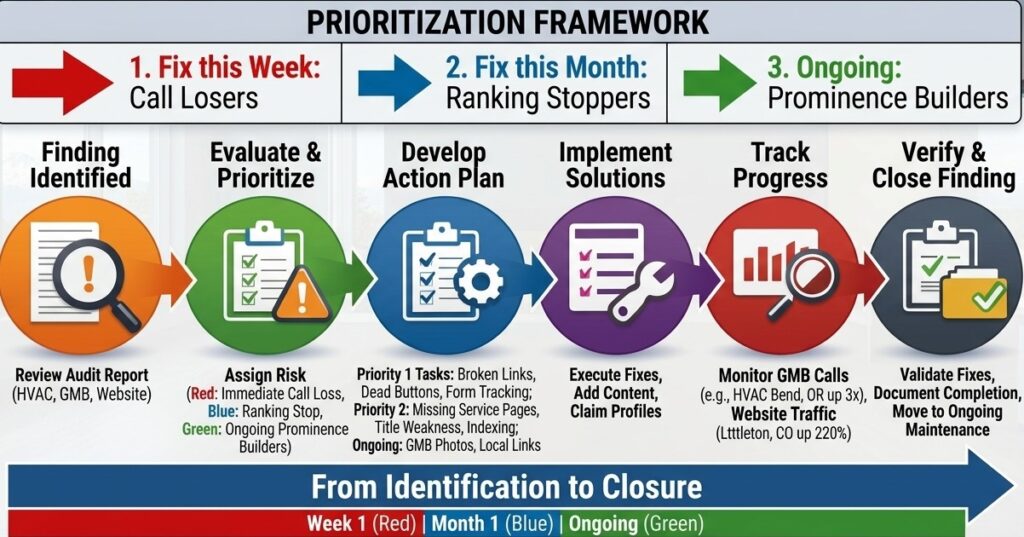
An audit usually turns up a long list. Sort it into three groups:
- Fix this week: anything that loses a call today. Broken phone links, dead buttons, a form that doesn’t send, wrong hours, a wrong phone number on any listing.
- Fix this month: anything that stops a page from ranking. Missing service pages, pages not indexed, weak titles, duplicate listings, an incomplete profile, missing or wrong schema.
- Ongoing: what builds prominence. Reviews, photos, local links and new content, done every month.
Here is what that order looks like in practice. An HVAC company in Bend, OR went from barely visible to the top 3 in Google Maps within 4 to 6 months, with Google Business Profile calls up 3 times and website traffic up 220%. An HVAC, plumbing and electrical company in Littleton, CO followed the same order and reached the top 3 in the Maps results within 4 to 6 months, with website traffic up more than 200% and profile calls tripled.
DIY audit or professional audit?
You can run every check above yourself. Where owners get stuck is the next step: knowing which competitor gaps matter, writing service pages that rank, and fixing technical issues on the site without breaking it. If you want the audit done for you, our HVAC SEO services start with exactly this review, and our guide to local SEO for HVAC contractors covers the work that follows. If you are starting from zero, read SEO basics for HVAC companies first, then pick the searches your pages should target with our guide to HVAC keywords for SEO. Most profile failures from section 1 are fixed with Google Business Profile management.
FAQ
How often should an HVAC company run an SEO audit?
Run a full audit once a year and before any website rebuild. Check the lead tracking items and your Google Business Profile every month, since wrong hours or a broken phone link cost calls right away.
Does an HVAC SEO audit cover AI search?
It should. Google says AI Overviews and AI Mode have no extra requirements beyond normal Search, so the same checks apply: indexed pages, clear answers near the top of each service page, and schema that matches the page. A good audit also checks whether your pages can show a snippet at all.
What tools do I need for a free SEO audit?
Google Search Console, your Google Business Profile dashboard, PageSpeed Insights and your own phone cover most of this list. Search your business name and phone number on Google and Yelp to find duplicate listings.
What is the most common problem an HVAC SEO audit finds?
Missing service pages. Many HVAC sites list every service on one page, so Google has no page to rank for “AC repair” or “furnace installation” in each city. Broken phone links and buttons on mobile come a close second.
Will an SEO audit improve my rankings by itself?
No. The audit shows what is wrong. Rankings and calls improve once the fixes are made and the profile, reviews and pages keep getting work each month.
Get a free SEO audit for your HVAC company
We’ll run this checklist on your profile and website, compare you against the top 3 HVAC companies in your area, and send you a prioritized fix list. No cost and no obligation. Call (713) 949-7909 or request your free audit.